Notan Maker & Image Simplifier
Upload a reference photo and simplify it for easier value study, shape recognition, and painting preparation.
Upload an image to get started.
Use the controls to simplify your reference for drawing.
What is notan, and how do you make one?
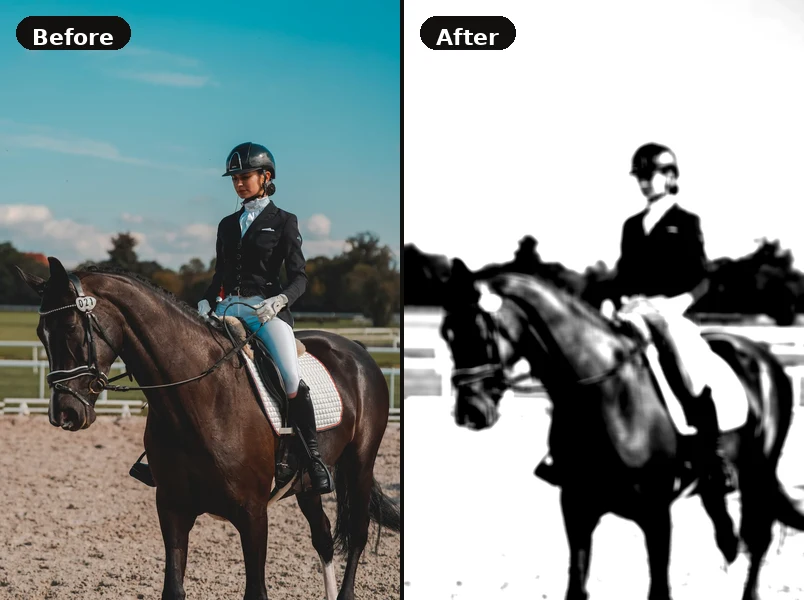
Notan (濃淡) is a Japanese design concept meaning “light–dark harmony.” A notan study reduces an image to a small number of flat tones — classically just two, pure black and pure white — and throws away every detail in between. What survives is the composition's skeleton: the arrangement of masses, the balance of positive and negative space, and whether the design reads at a glance.
It is one of the fastest diagnostics in picture-making. A painting that fails as a notan will fail at full size too, because no amount of colour or rendering can rescue a composition whose big shapes are muddled. Traditionally artists cut black paper and glued it down; this tool does the same thing in a couple of seconds, and lets you step through 2, 3, 4 or more tones to see where the structure holds and where it collapses.
To make a notan here: upload a reference photo, switch to greyscale, and drag the levels control down to 2 tones for a classic two-value notan. Move up to 3–4 tones for a value study that keeps a little more information — useful for planning a painting rather than just testing a composition. Everything is processed in your browser, so nothing is uploaded.
For the full background — where notan comes from, worked examples and design exercises — read our guide to what notan is. The same posterising process is also how you build a value study: where notan asks “does this composition work?”, a value study asks “where exactly do the tones sit?” The two are worth doing together.
How to use the Image Simplifier
- Upload a reference photo using the controls panel on the left.
- Enable Grayscale to strip colour and see only value relationships.
- Use the Posterize slider to reduce the image to 2–4 value zones — great for value planning.
- Increase Contrast to make light and shadow areas more distinct.
- Use Blur to suppress fine detail and focus on large shapes.
- Download the result as a PNG reference for your drawing session.